

What Is A RAW File And Why Is It Important?
Explore this post further with AI
If you’ve ever worked with a creative agency, you’ve probably heard that question. You know the one — said with a mix of hope and urgency:
“Do you have the RAW file?”
We know, we know. We sound like a broken record, obsessed with those three little letters. But here’s the thing, they matter. A lot. For photo and video editors, a RAW file is the difference between pretty good and pretty incredible.
And if you know me, you know “good” doesn’t make the cut. Great does. Because great is where the magic happens, it’s where good creative turns into unforgettable creative.
Let’s break it down, shall we? Because next time someone tosses out a “Do you have the RAW file?” you’ll already know the deal, and maybe even have it queued up.
THE RAW TRUTH
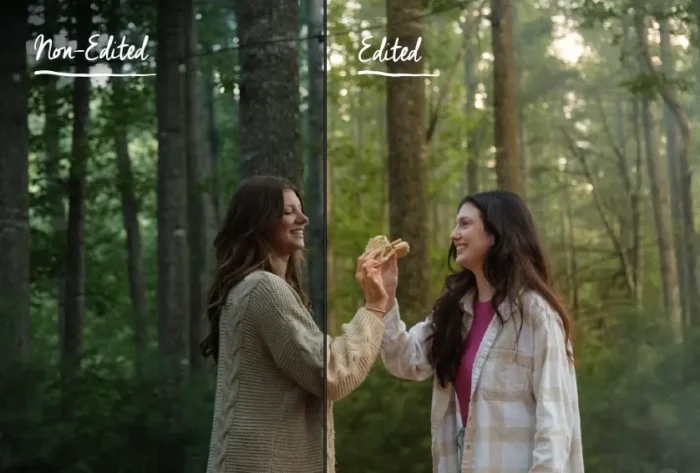
A RAW file is a digital image file that contains minimally processed data directly from a camera’s image sensor. Unlike compressed formats such as JPEG, a RAW file preserves the full range of color, light and detail captured at the time of shooting, allowing for greater flexibility and control during post-production.
So that’s a complicated and lengthy way to say that a RAW file is simply a type of photo or video file that holds everything your camera captured: every bit of color, light and detail before it gets edited or compressed. Think of it like the ingredients before the recipe, or the film negative before it’s developed.
It’s not polished or ready to post, but it gives your editor all the freedom in the world to make it look its absolute best.
THE BUTTON IS JUST THE BEGINNING
Capturing photo and video might look as simple as pressing a button, but trust me, there’s a lot more happening behind the lens. Every shot involves a cocktail of settings: shutter speed, aperture, ISO, lighting, timing… and sometimes, we nail it right out of the gate. But other times? Something’s just a little off. Lighting can shift, the color temperature goes rogue or the shadows don’t play nice.
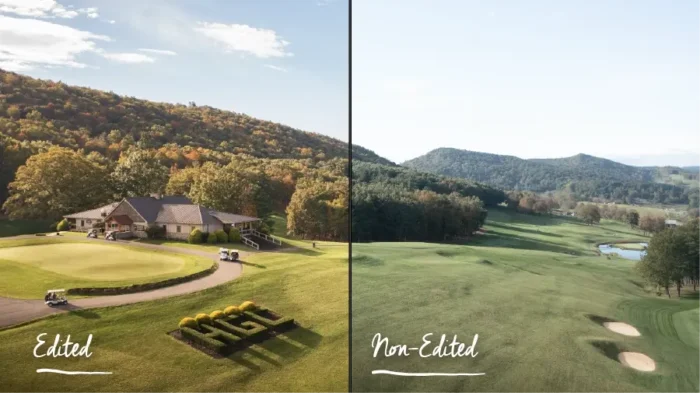
Here’s the thing: If you’ve ever seen an image from a professional, it’s been edited. Always. It’s not cheating, it’s part of the process. Editing is where good shots become great ones. It’s where the creative control lives.
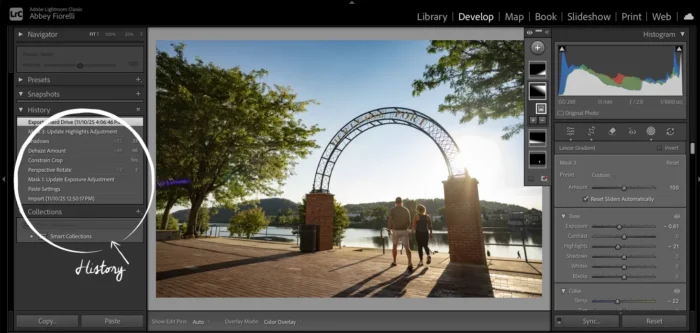
That’s why we shoot in RAW. Shooting in RAW means we’re capturing all the data, including every bit of light, color and detail your camera can hold. That extra information gives us the power to fix what didn’t go quite right and fine-tune what did: white balance, exposure, contrast and the subtle stuff that makes an image sing, all without hurting the quality.
And here’s a fun fact: every time you save a JPG, it loses a little quality. It’s like making a copy of a copy — eventually, it shows. That’s why editing JPGs (or compressed video files) is a big no-no. RAW keeps every ounce of image data intact, so when it’s time to use that content in an ad campaign, it looks crisp, clean and exactly as it should.
HOW RAW KEEPS EVERYTHING IN SYNC
We get it. You already have the photo or video; it’s been edited by a pro and looks great. So why on earth are we still asking for the RAW file? Fair question.
Here’s the thing: whether we’re laying out a print guide or cutting a :30 TV spot, we’re pulling together a lot of moving parts and they all have to play nice together.
When we’re designing something like a guide or brochure, we might use photos taken by different photographers over different years, with totally different editing styles. Trends shift, gear changes and every artist has their own signature look. That’s great for creativity but not so great for consistency. Our job is to make those pieces feel like one cohesive story, not a patchwork of mismatched tones and filters. Even when we’re using our own photos, we’ll go back and re-edit them to ensure they fit seamlessly within your brand’s visual world.
And when it comes to video? RAW files are the MVP. We’re often blending clips shot in different seasons, lighting conditions or locations, which means we need the flexibility to fine-tune color temperature, white balance and exposure so every frame feels like it belongs together. Sometimes we even need to crop or “punch in” on a shot to make the action pop. You can’t do that cleanly without a RAW file.
Another big win for RAW files? Brand updates. A few years ago, one of our partners decided to move away from the warm, golden tones they’d loved for years and shift toward a brighter, more vibrant look. Luckily, because we had all their RAW photo and video assets, that change was a breeze. Instead of spending tens of thousands on new shoots, we simply re-edited the existing RAW files to align with the new direction. No loss in quality, no headaches, no panic — just a quick color refresh, and bam, brand update complete.
GETTING US THE GOOD STUFF
Now that you know why we’re so passionate about RAW files, you’re probably wondering what exactly you need to track down for us. Fair question — and honestly, it’s a bit of a scavenger hunt. Every camera brand has its own special flavor of RAW, which means file names can get… interesting.
The good news? You don’t have to memorize them all. It’s usually easier to remember what isn’t RAW — those common, easy-to-share formats like JPGs and MP4s. If it opens instantly or uploads in seconds, it’s probably not the one we’re after.
And if you’re ever unsure, just ask for the RAW file. That simple question will usually point you in the right direction, unless it doesn’t exist, in which case… well, that’s another conversation entirely.
BE GREAT. CREATE GREAT. GO RAW.
At the end of the day, asking for the RAW file isn’t us being picky, it’s how we make your visuals look their best. RAW files give us the flexibility to fine-tune every color, light and detail until everything feels perfectly on-brand.
They might be big, clunky and a little harder to find, but they’re where the magic starts. So the next time we ask, “Do you have the RAW file?” just know it’s not nitpicking. It’s how we turn good into great.
Photo File Types
RAW (The Good Stuff)
- CR2 / CR3 (Canon)
- NEF / NRW (Nikon)
- ARW / SR2 / SRF (Sony)
- ORF (Olympus)
- RAF (Fujifilm)
- RW2 (Panasonic)
- PEF / DNG (Pentax, Adobe)
Compressed (The Polished Ones)
- JPG / JPEG
- PNG
- TIFF
- HEIC / HEIF
- WEBP
- GIF (fun for memes, not for marketing)
Video File Types
RAW (Cinematic Gold)
- BRAW (Blackmagic RAW)
- R3D (REDCODE RAW)
- ARRIRAW (ARRI cameras)
- CRM (Canon RAW Movie)
- ProRes RAW (Apple)
- CinemaDNG (Adobe)
Compressed (Everyday Formats)
- MP4 (H.264 / H.265)
- MOV
- AVI
- MPEG / MPG
- MKV
- FLV

Abbey Reifsnyder
Chief Creative Officer